


Resources
Voice Search for Local Businesses: What ‘Hey Google, Find a [Service] Near Me’ Means for Your Website

![Voice Search for Local Businesses: What 'Hey Google, Find a [Service] Near Me' Means for Your Website](https://growthmediastrategy.ca/wp-content/uploads/2026/10/7.png)
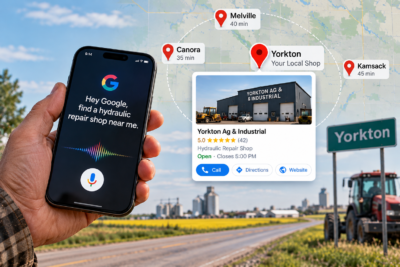
A farmer is parked on a gravel road outside Yorkton with a split hydraulic hose. One hand is still on the wheel when he says, “Hey Google, find a hydraulic repair shop near me.”
His phone answers in seconds. It doesn’t show him ten options. It reads out one or two, and he calls the first.
If your business wasn’t named, you didn’t lose a ranking. You lost the job, and you never knew it existed.
That’s the part of voice search optimization most owners miss. It isn’t a new kind of SEO. It’s local SEO where the winner takes most of the prize. Below is what decides who gets named, plus a gap most advice skips: how this works when your nearest competitor is forty minutes away.
What Voice Search Optimization Means for a Local Business
Voice search optimization is the work of making your business easy for a voice assistant to find, trust, and read aloud. For a local business, that means accurate listings, a complete Google Business Profile, and website pages that answer spoken questions in plain language.
People talk differently than they type. Typed: “plumber Yorkton.” Spoken: “Who’s a good plumber near me that’s open right now?” The spoken version is longer, more specific, and usually urgent. Someone asking out loud is rarely browsing. They want a phone number.
How a “Near Me” Voice Query Gets Answered
Google has said publicly that local results depend on relevance, distance, and prominence. Voice doesn’t change that formula. It just shrinks the output from a page of results to a sentence or two.
Relevance is how well your profile and pages match the question. Distance is how close you are to the person, or to the town they named. Prominence is how well known you are, judged by reviews, links, and mentions around the web.
Your website supports all three, but it’s rarely the first thing checked. Your Google Business Profile does most of the heavy lifting. If it’s half-finished, no amount of blog writing will rescue you. (If that sounds familiar, our guide on ranking your Google Business Profile in the local pack is the place to start.)
The Gap in Most Voice Search Optimization Advice: Rural Businesses
Most guides assume a city, with dozens of competitors per block. Saskatchewan doesn’t work that way.
In low-density areas, there may be no matching business within a few kilometres. When that happens, Google has to stretch its search radius to find anything to say. Across the small and rural business profiles we manage, this is a real advantage: a business can surface for people in towns well beyond its own because less competition surrounds it.
Two things follow from that.
Rural customers name places, not “near me.” They say “find a vet in Melville” or “tire shop between Yorkton and Canora.” If your site only mentions your home town, or just says “Saskatchewan,” those phrasings never find you. Build a real page for each community you genuinely serve. Include what a local would care about, like drive time from that town, the roads you travel, and jobs you’ve done there. Skip the copy-paste template with the town name swapped out. Google sees through it, and so do customers.
Rural searches often happen on weak signal. The CRTC has set a target of 50 Mbps download and 10 Mbps upload as basic internet service for Canadians, and rural coverage is still catching up. A page that crawls on a patchy connection loses the visit even if the assistant names you. Compress images, remove heavy scripts, and keep the site maintained. Speed here isn’t polish. It’s access. If your site has gotten sluggish, our website maintenance service is built for exactly that.
Voice Search Optimization Checklist: What to Fix First
1. Make your Google Business Profile say what you actually do
Choose the most precise primary category. Add each service individually. Keep hours current, including holidays. “Open now” is one of the most common spoken filters, and a wrong closing time means a customer standing at a locked door.
2. Match your name, address, and phone number everywhere
Use the same format on your site, your profile, and every directory. Small differences, like “Street” in one place and “St.” in another, make it harder for systems to confirm you’re one business. Clean up the directories first.
3. Write headings like questions, then answer in the first sentence
Try a heading such as “Do you offer emergency service in Canora?” Then answer it directly in 40 to 50 words before adding detail. Voice assistants and AI answer boxes both favour short, self-contained answers. It’s the same habit that wins featured snippets, and it also helps visitors who skim. (Wondering why AI answers skip your business? This is a big part of it.)
4. Add local business schema
LocalBusiness schema labels your name, address, phone, hours, and service areas in a way machines read without guessing. It isn’t magic, but it removes ambiguity. Test it with Google’s Rich Results Test before you publish.
5. Treat reviews as spoken evidence
A review that says “fixed our furnace in Yorkton on a Sunday” reinforces both service and place. Ask every customer, and let them use their own words. Never buy, write, or script reviews. The Competition Bureau of Canada treats misleading reviews as deceptive marketing. Reply to each review yourself, in your own voice.
6. Make the call effortless
Put a tap-to-call button at the top of every mobile page. Write your phone number as text, not as part of an image, so assistants and visitors can both use it.
Try This 10-Minute Voice Search Test
You don’t need software for this.
- Ask your phone out loud: “Find a [your service] near me.” Then try “[your service] in [your town].” Then “Who’s open now?”
- Write down who gets named, and who doesn’t.
- Compare your profile to the businesses that appear. Check category, hours, photos, and review count.
- Turn off Wi-Fi and open your site on mobile data. Notice how long it takes.
Results vary by device and location, so treat this as a snapshot. Repeat it monthly. It tells you more than most reports will.
Measuring Voice Search Optimization Without a “Voice” Report
Here’s the honest part: Google doesn’t separate voice searches in its reporting. You can’t pull a clean number, and anyone who promises one is guessing.
What you can watch is the trail. In your Google Business Profile, track calls and direction requests. In Search Console, look for longer, question-style queries and “open now” phrasing. If profile calls rise while website clicks stay flat, voice and mobile behaviour may be part of the reason. These are signals, not proof, but over a few months the pattern is usually clear.
Where to Go From Here
If your listing is incomplete, fix that first. If your site is slow, fix that second. Then write the pages your customers’ spoken questions actually need.
If you’d rather have someone review the whole picture, Growth Media Strategy’s local SEO team works with small and rural businesses across Saskatchewan, and we’re happy to look at yours.
Voice Search Optimization FAQs
What is voice search optimization?
It’s making your business easy for voice assistants to find and read aloud. That means a complete Google Business Profile, consistent listings, fast mobile pages, and content that answers spoken questions directly.
Does voice search optimization work for rural businesses?
Yes, and often better. With less competition, Google stretches its local radius. Pages naming the specific towns you serve help you match how rural customers phrase their searches.
Do I need a separate website for voice search?
No. Voice search uses the same local signals as regular search. Improve your profile, listings, and existing pages rather than building anything new.
How do I know if voice search is sending me customers?
Google doesn’t report voice separately. Watch profile calls, direction requests, and question-style queries in Search Console to spot the pattern over time.